> For the complete documentation index, see [llms.txt](https://help.shamods.com/llms.txt). Markdown versions of documentation pages are available by appending `.md` to page URLs; this page is available as [Markdown](https://help.shamods.com/our-products/fivem/super-spoofer-temp-perm/video-tutorial-fivem-spoofer.md).
# Video Tutorial FiveM Spoofer
This is a complete guide on how to use the Superino FiveM Spoofer, and extra steps required by you to be unbanned.
#### [](https://docs.superino.gg/guides/requirements#load-the-spoofer)Load the Spoofer
Make sure antivirus providers are fully disabled during the spoof process, drivers may be Interfered with which could lead to windows corruption or products failing to load.Open the Loader, and set configuration to unlink all accounts, this is needed if you are actively banned. If you are spoofing on PC restart, you do not need to unlink your accounts again. If you are using the permenant spoofer you do not need to spoof again on PC restart.Hold the Execute button until it switched to Loading state, if the operation succeeds with no error message continue with the next steps.
#### [](https://docs.superino.gg/guides/requirements#make-steam-account)Make Steam Account
This task is only needed if the server requires Steam to play.If the server requires Steam you must make a new account since the old will be banned, you may purchase a used Steam account but it comes with the risk of already being banned.Simply create a new Steam account, you do not need to re-purchase GTA. GTA is already synced to your PC.
#### [](https://docs.superino.gg/guides/requirements#unlink-cfx-re-account)Unlink [CFX.re](http://cfx.re/) Account
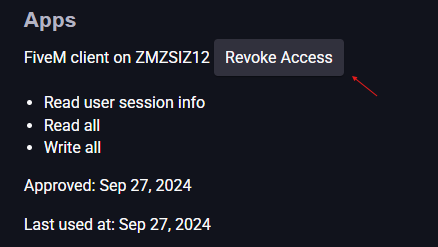
If connected you must unlink your [https://forum.cfx.re](https://forum.cfx.re/) account from FiveM. You can do this by visiting the forum link, signing in with your connected account.Click on the User Icon in the top right, then click the Profile Icon. Click Security and then scroll to the bottom, you must remove “Apps” to do this click Revoke Access on each client connected, as shown in the image below.
 #### [](https://docs.superino.gg/guides/requirements#unlink-discord)Unlink Discord
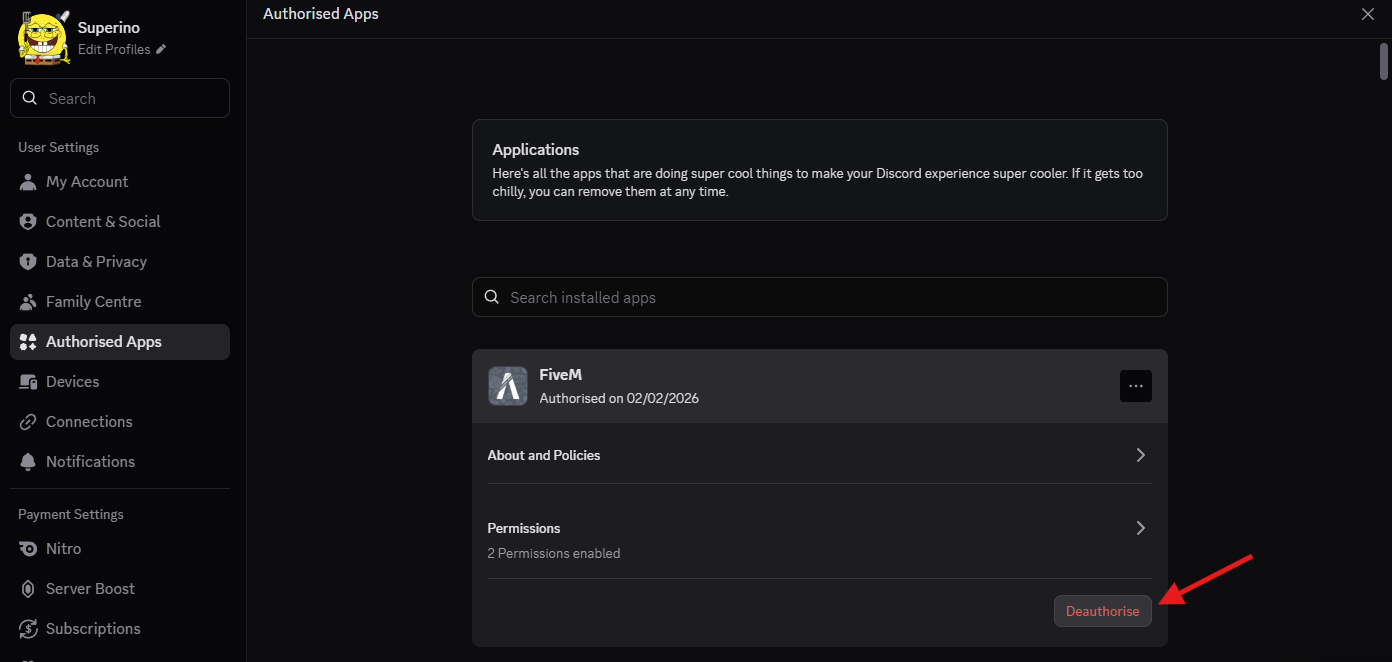
Do not re-link a banned Discord account, when you open FiveM will ask to authorise Discord, do not allow unless you are on a fresh unbanned Discord.Discord must be unlinked as it is another banned account linked, to do this go to Discord settings, then clicked Authorised Apps, search for FiveM and click Deauthorise.If server requires Discord to be connected, you must create a new one and authorise the unbanned one, do not connect old Discord account.
#### [](https://docs.superino.gg/guides/requirements#unlink-discord)Unlink Discord
Do not re-link a banned Discord account, when you open FiveM will ask to authorise Discord, do not allow unless you are on a fresh unbanned Discord.Discord must be unlinked as it is another banned account linked, to do this go to Discord settings, then clicked Authorised Apps, search for FiveM and click Deauthorise.If server requires Discord to be connected, you must create a new one and authorise the unbanned one, do not connect old Discord account.
 #### [](https://docs.superino.gg/guides/requirements#video-reference)Video Reference
{% embed url="" %}
#### [](https://docs.superino.gg/guides/requirements#video-reference)Video Reference
{% embed url="" %}