> For the complete documentation index, see [llms.txt](https://help.shamods.com/llms.txt). Markdown versions of documentation pages are available by appending `.md` to page URLs; this page is available as [Markdown](https://help.shamods.com/our-products/rainbow-six-siege/crusader.md).
# Crusader
## Undetected
Utilize the menu on the left side of your screen and go step by step through the guide to successfully inject Crusader. Begin at "Before Injecting" Do NOT skip straight to loader.
### How to download and run Crusader correctly?
Step-by-step instructions for running the software:
1. After payment, you will receive a key to activate access to the software.
2. Download the loader [using this link](https://uniqueloader.com/r6s/). The password for the archive is 123.
3. Extract the files from the archive and place them in a separate folder. The folder name should be written in English letters, it is recommended to place this folder in the root of the C drive.
4. Run the cheat loader as administrator.
5. Insert your key into the "Serial Key" field and click "Sign In".
6. After a short loading, you will see the R6S icon.
7. Click the "**Start Injection Process**" button.
8. The message "**Please Open Rainbow Six Siege**" will appear, it's time to launch the game!
9. When the game starts, press the "**Insert**" key while in the main menu.
10. The cheat menu will appear in front of you. The key to close/open the menu is **Insert**.
If you plan to use Crusader with a spoofer, always run the cheat loader first, and then the spoofer.
### Common problems and solutions.
Here we have collected popular problems and ways to fix them:
* Uninstall Faceit anti-cheat and Riot Vanguard using "Add or Remove Programs". Anti-cheats prevent cheats from working;
* Disable all antiviruses on your computer, and also completely disable Windows Defender (Real-time Protection).
* If you have problems with launching/injection, then you need to download [this file](https://mega.nz/file/uURS0ZgL#gn9i_rBW__80V9uzexA_Cr2vPUPNGQK2aif4qtevXHs). Run the file and restart your PC, then try to run the cheat again. You should also disable kernel isolation and vulnerable driver blocking in Windows Defender.
* To run the cheat, you must also disable Reputation-based Protection.
1. Open the start(windows) menu and search for “Reputation-Based Protection.” Open this window.\
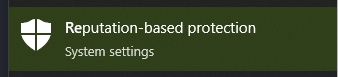
2. In the window that opens, disable all options.
* Also, if you have problems with cheat injection or other problems during the game (ESP lags, etc.), then try switching the screen mode to "Borderless / Windowed)" in the game settings.
***
If you have any difficulties or questions, please contact our support [On our discord server ](https://discord.gg/shasupport)